 Scoreflection
Frequently asked questions
Everything people ask about the listening engine, the instruments it supports, what it does with your scores, and what never leaves your phone. Still stuck after this? Write to us.
Getting started
What is Scoreflection?
Scoreflection is a mobile app that displays sheet music and listens while you play it. A neural transcription model runs on the phone itself: it turns the sound of your instrument back into notes, follows your place in the score bar by bar, and marks every notehead as correct, wrong, missed or mistimed.
How is Scoreflection different from Simply Piano, Yousician or flowkey?
Simply Piano, Yousician and flowkey are built around their own catalogue of songs and lessons. Scoreflection works the other way round: you bring the score (MusicXML, MXL, MNX or LilyPond), and it listens while you play that score, marking every notehead as correct, wrong, missed or mistimed. Chords and both hands are heard through the microphone, and the listening runs on the phone, so it works offline. There is no beginner course, so if you want to be taught from the very first note, a course app is the better start.
A sourced comparison with more apps is on the comparison page.
Also asked as: Yousician alternative · Simply Piano alternative · flowkey alternative · Skoove alternative · piano app that listens to you play · sheet music app that listens · which piano app is best
What do I need to get started?
A phone, your instrument and a score. There is no audio interface to buy and no pickup to attach — the phone's own microphone is the input, so you put the phone somewhere it can hear you and play. A digital piano or MIDI controller can be connected instead if you have one.
Do I need an account to practise?
Not for reading. Opening a score, playing it back and using the tuner need neither an account nor a network connection, because all of that happens on the device. Being listened to and graded is part of the Practice plan, and the subscription is tied to an account, so for that you need to be signed in — the listening itself still runs on the phone and works offline. The community forum and the shared score library need an account as well, because they involve a server.
Playing and grading
How does the grading work?
While you play, the transcription model turns the sound into notes and the score follower keeps track of which bar you are in. Each note it heard is then lined up with the notehead it was meant to be, and that notehead is marked on the page you were reading. Octave slips are recognised for what they are, and your instrument's own overtones are discarded before anything is counted against you.
What do the marks on my score mean?
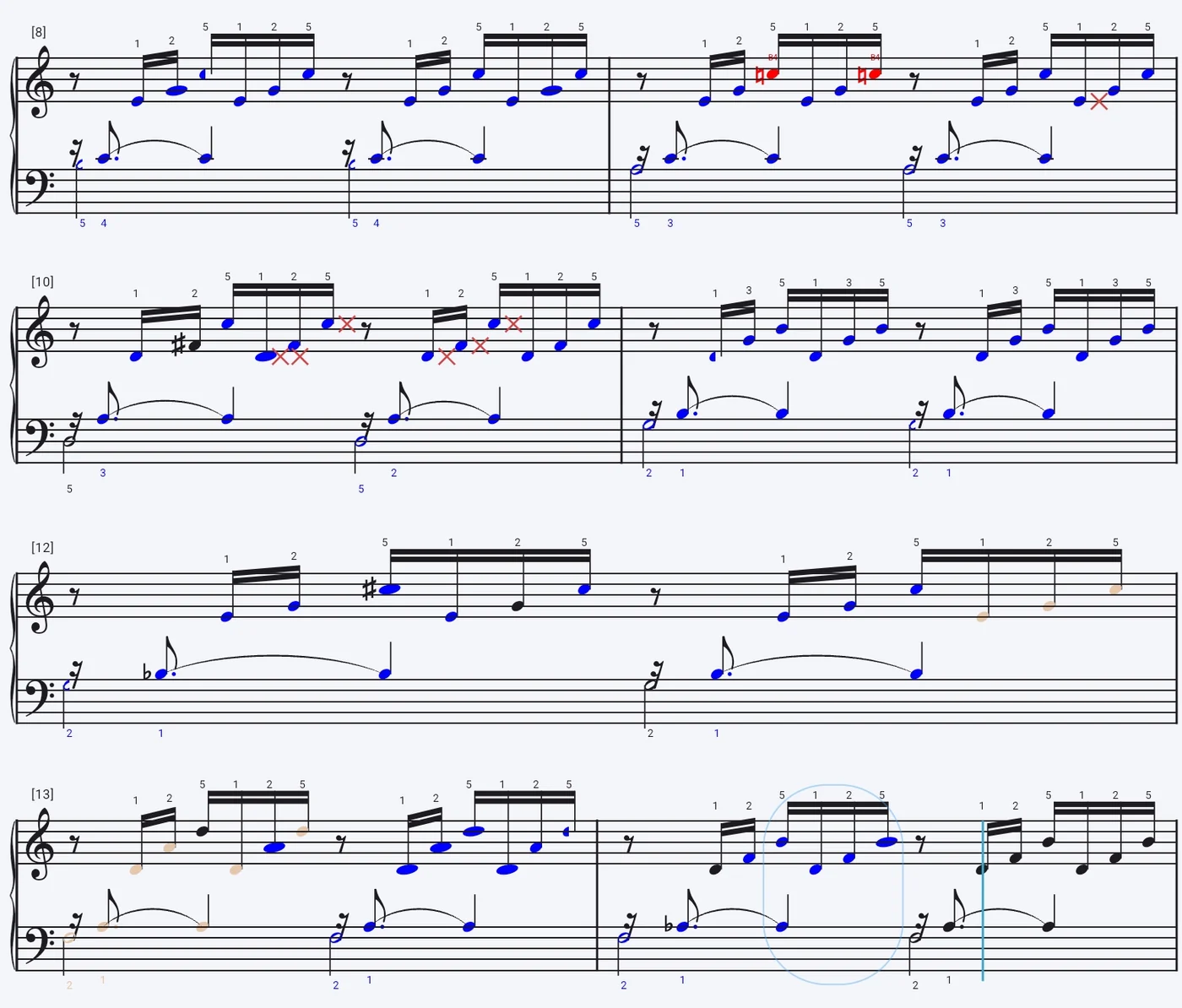
A blue notehead is a note you played correctly. A pale head is correct but played too softly, and an amber one correct but too loud. Red marks a wrong pitch, a red cross marks a note you played that was never written, and a dark grey head is a note you never played at all. Timing shows up in the shape rather than the colour: a stretched head was held too long, and a circled passage was rushed or dragged. The shape carries as much information as the colour, so the page is readable at a glance and without relying on colour vision.
What do I get at the end of a session?
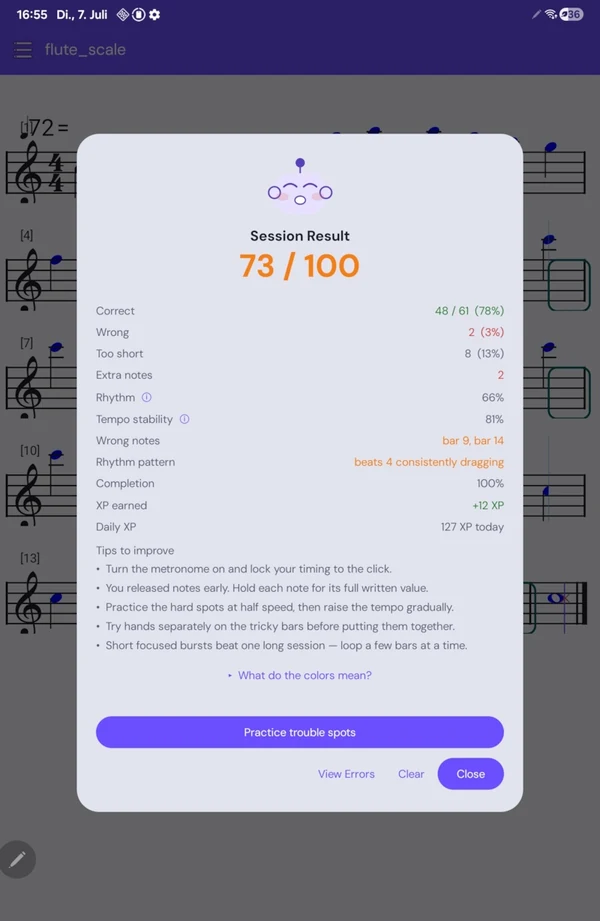
A score out of 100 for the run-through, the marked-up page showing every notehead's verdict, a count of how many notes were correct, wrong, missed or too short, and specific tips about what to work on next. On the Practice plan every session is kept, so the same passage can be compared across weeks.
It marked a note wrong that I am sure I played. Why?
The engine gets about 95% of note attacks right, so the remaining few percent do turn up in a long piece. In practice most disputed marks come from the room rather than the model: a phone too far from the instrument, a noisy space, or a very soft note that never made it above the background. Moving the phone closer usually settles it, and connecting a MIDI instrument removes the question entirely, because then no microphone is involved. If the same marks keep coming back, turn on audition mode: you play the piece three times, and only a note you get wrong in at least two of the three rounds is kept as a mistake, so a one-off slip is forgiven.
Does it cope with repeats, and with starting a bar over?
Yes. The score follower reads the structure of the piece, so repeats, first and second endings and a sudden D.C. al fine do not throw it. When you lose your place and start a bar again it finds you rather than marking everything after that point wrong.
How is this different from a tuner app?
A tuner estimates one frequency at a time. Scoreflection runs a transcription model that returns actual notes — chords and both hands included — and matches them against the score in front of you. That is what lets it tell you that you played the right note at the wrong moment, which a tuner cannot see.
Instruments and input
Which instruments does it work with?
Piano and the fretted strings (guitar, ukulele) are supported today — those are the ones measured against real recordings. Listeners also exist for bowed strings, woodwind, brass and voice, and those are still under development rather than finished. The engine handles single-line instruments and polyphonic ones like piano and guitar, so chords and both hands are transcribed rather than reduced to one note at a time.
That list is not finished. Instruments are added as the engine learns to hear them, and what gets added is largely what people ask for, so if yours is not there yet we would genuinely like to know.
Do I need a MIDI instrument, or is a microphone enough?
A microphone is enough for any acoustic instrument, and for singing. If you play a digital piano or a MIDI controller you can connect it directly, which takes room noise out of the equation entirely.
How do I connect a MIDI keyboard?
Connect the instrument to the phone over USB MIDI and pick it as the input for the session. From that point the engine reads the notes the keyboard sends instead of listening through the microphone, so nothing in the room can interfere with the reading.
Can it hear singing?
Yes. Voice is one of the supported families, and it works through the microphone like any acoustic instrument — there is nothing extra to set up.
My instrument is not in the list. Will it be?
Very likely, and telling us moves it up. The list of instruments the engine can be set to listen for is added to as it learns to hear them, and what we work from is largely what people write in and ask for — so if yours is missing, say what you play. It is the single most useful thing you can send us.
In the meantime it is often worth trying the nearest instrument in the same family. What the setting really decides is whether the app listens for one note at a time or for chords, and how far to shift the pitch for a transposing instrument — so a single-line instrument close to yours in range will frequently read well enough to practise against. Connecting over MIDI sidesteps the question entirely, since a MIDI instrument sends the notes rather than a sound to be identified.
Also asked as: not supported · my instrument is missing · will you add · unsupported instrument · request an instrument · roadmap · cello · trombone · harp · accordion · bassoon · oboe
How do I tell you something is wrong, or ask for something?
Write to us. There is no form to fight and no ticket number: get in touch and a person reads it. Reports about listening are the most valuable kind, because they are the hardest thing for us to find on our own — what you play, what the app heard instead, and roughly what the room was like is enough to act on.
A file that another program wrote and this one will not open is worth sending too. More often than not that is a gap in what we read rather than a bad file, and it is fixed for everyone at once.
Also asked as: feedback · contact · bug report · support · it heard me wrong · feature request · suggestion · complain · get help
Scores and import
Which file formats can I import?
MusicXML, MXL, MNX and LilyPond. Imported scores stay in your library and remain available offline.
How do I import a score?
Open your library, choose to add a score, and pick the file from your phone's storage or from wherever you keep it. It is parsed on the device and lands in your library, ready to play along with straight away. Importing is part of the free tier, with no limit on how many scores you bring in.
There is a step-by-step guide to getting your own sheet music into the app, including exporting MusicXML from MuseScore, Dorico, Sibelius, Flat and Noteflight.
Can I write or edit scores in the app?
Yes. The notation editor comes with Practice, along with annotations, so you can write a piece from scratch, fix an import that came in wrong, or mark up fingerings and reminders on a score you already have. It sits with a plan rather than in the free tier because it records from a MIDI keyboard or the microphone and transcribes what it hears — the same listening engine a subscription pays for.
Can I use a photo of a printed page?
Yes. Photographing a printed page is one of the few features that uses our server rather than the device, because reading a photograph of notation is a much heavier job than playing one back. Everything after the scan — playing along, grading, the verdicts on the page — happens on the phone as usual.
Are my scores available offline?
Yes. Scores in your library stay on the device and open without a connection, and so does everything the listening engine does with them. Practising on a train or in a practice room with thick walls works exactly the same as practising at home.
Using the score viewer
Where are the controls while a score is open?
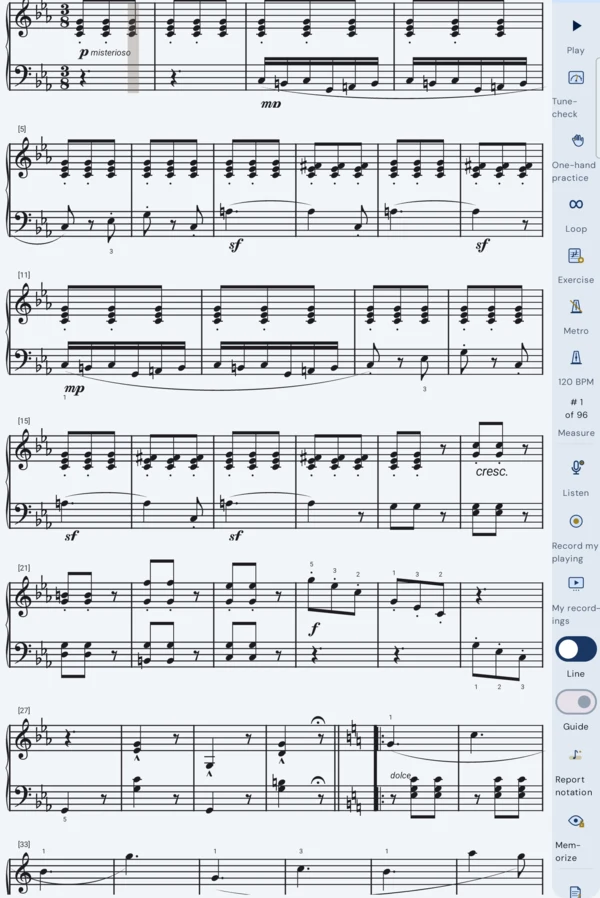
Along the right-hand edge. A score is meant to fill the screen, so everything you can do to it lives in a rail that stays shut until you want it: pull the tab on the right edge and the panel slides in over the page. Playback, tempo and the metronome, looping a passage, the per-voice sounds and colours, transposing, one-hand practice, recording and export are all in there.
The score stays visible next to the open rail, so anything you change shows up on the page while you are still looking at the control that changed it.
Also asked as: score viewer · file viewer · sheet music screen · settings drawer · side panel · toolbar · where is the menu
How do I make the app play a piece to me?
Open the rail on the right-hand edge of the score and press play. The app performs the score through its built-in soundfont, draws a line that travels along the staff as it goes, and scrolls the page so the bar being played stays in view, which makes it the quickest way to find out how an unfamiliar piece is meant to sound before you try to play it yourself.
Playback needs no microphone, no account and no network connection, and it costs nothing: it is part of the free tier.
Also asked as: hear the piece · listen to the sheet music · audio preview · MIDI playback · play the notes back · what does this sound like · demo the score
How do I slow a piece down or speed it up?
Tempo sits in the control rail next to the metronome, as a beats-per-minute readout with a slider under it, and the number you set there governs both playback and the beat the metronome clicks. The score's own written tempo is where it starts, so taking a passage down to a speed you can actually play is a matter of dragging the number down and building it back up over a few days.
If you would rather the app followed you than led you, turn on Adapt Speed: it listens through the first three measures, matches playback to the tempo you are really playing, and then holds that speed for the rest of the piece.
Also asked as: slow down · practice tempo · BPM · half speed · speed trainer · metronome speed · play slower
How do I make one passage repeat over and over?
A loop runs from where you are to a bar you pick. Put the line on the point the loop should start from, open the control rail and tap the loop icon, then either tap the bar that should end it or type that measure number into the box. From then on both playback and listening stay inside those bars and go round them, which is what you want for the four bars that keep going wrong rather than for the whole movement.
Tapping the loop icon a second time drops the scope and gives you the whole piece back.
Also asked as: repeat a section · practice loop · A-B repeat · loop bars · drill one passage · cycle a few measures
How do I change which instrument a part is played back with?
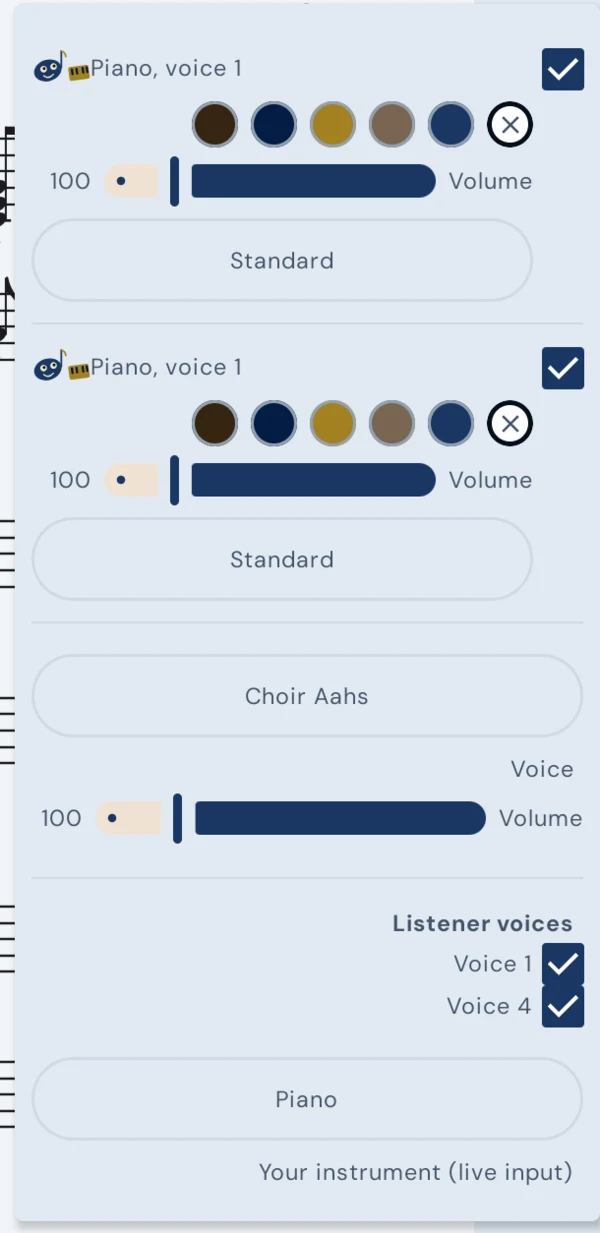
Every voice in the score gets its own sound, set from the Voices & Sounds list in the control rail. Each voice that actually has notes gets a row there, labelled with the part name the file itself carries, and the dropdown on that row chooses what plays it. The list is the General MIDI set with a search box at the top, so typing cello or organ beats scrolling through a hundred and twenty-eight entries.
This changes what you hear and nothing else: the notes on the page are untouched, the file on disk is untouched, and switching a part to a different instrument has no effect on how the app grades what you play.
Also asked as: change the timbre · different instrument sound · General MIDI program · patch · soundfont voice · make it sound like strings · playback instrument
How do I silence one voice, hand or part?
The same Voices & Sounds list in the control rail that picks each voice's instrument can also switch one off: open the sound dropdown on that row and choose No Sound, and that voice goes quiet while everything else keeps playing. If you want it quieter rather than gone, every row also carries a volume slider, so the left hand can sit underneath the right instead of vanishing.
Silencing is a playback setting only. The notes stay on the page, and they still count when the app listens to you and grades what you played.
Also asked as: mute a part · turn off the left hand · solo one line · play only the melody · accompaniment only · minus one · backing track
How do I make a line or a staff disappear from the page?
Each row of the Voices & Sounds list in the control rail begins with a checkbox, and clearing it takes that voice off the page. It is the fastest way to cut a two-staff piano score down to the one hand you are working on, or to strip the accompaniment out of a song so that only the vocal line is left to read.
Hiding and silencing are separate controls on the same row, on purpose. You can hide a part and still hear it, which is exactly what you want when you are playing along to an accompaniment you do not need to read, or you can hide it and mute it together and have it gone completely.
Also asked as: hide a staff · remove a stave · show only one hand · hide the accompaniment · declutter the score · fewer lines · hide a track
Can I colour one voice so I do not lose it between the staves?
Yes. Every row in the Voices & Sounds list carries a strip of colour swatches, and choosing one tints every notehead that belongs to that voice. Where two voices share a staff, or an inner part keeps crossing over the one above it, having the line you are supposed to be playing in a colour of its own is often the difference between reading the music and guessing at it. The leftmost swatch clears the tint again.
Also asked as: highlight a voice · colour code the parts · tint the notes · mark my line · colour the melody
The notes are too small. How do I make them bigger?
Pinching zooms in for a quick look. To make the notes bigger for good, change the staff size: it is a setting rather than a pinch, because the layout has to re-wrap the music around whatever size you choose. There are two numbers for it: the preferred staff size, which is what the layout aims for, and the minimum, which is how far it may shrink a line that would otherwise run off the edge of the screen.
Raise the preferred size and the notes grow while fewer bars fit on each line. Set the minimum close to the preferred one if you would rather every line looked the same size than squeeze more music onto the page.
Also asked as: zoom in · bigger notes · enlarge the staff · font size · notes too small to read · magnify the score
How do I practise hands separately?
One-hand practice is in the control rail, and it does more than blank out a stave. The hand you are not playing can be heard as accompaniment, with a count-in, so you practise the right hand against a real left hand instead of against silence.
When the app is listening it also grades only the hand you chose, so the notes you are deliberately not playing are not held against you as missed.
Also asked as: hands separately · left hand only · right hand only · piano one hand · practise each hand
Can I hide the score and play from memory?
Yes. Memorize, in the control rail, blanks the score while you play. Because the app is still listening and still following the music, you find out where your memory actually gave way rather than only that it did, and the notes come back marked exactly as they would after any other run-through.
It needs the microphone switched on, since the entire point is that the app can still hear you when you can no longer see the page.
Also asked as: play from memory · blind audition · hide the sheet music · memorise a piece · cover the notes · test my memory
How do I transpose a score?
Transposing is in the control rail, and it comes in two forms because there are two different reasons to want it. Picking a key shifts the notes outright, which is what you need when a song sits too high to sing comfortably.
Choosing Transpose for instrument instead shifts the written pitch so that a transposing instrument reads the part correctly, as a B flat clarinet or an E flat alto saxophone must when playing from music written at concert pitch, and it tells you which way and how many semitones the score is about to move before you commit to it.
Also asked as: change key · transpose up or down · B flat instrument · concert pitch · transposing instrument · sing it lower
How do I turn the metronome on?
The metronome is in the control rail, next to the tempo readout, and it clicks at whatever beats-per-minute you have set there rather than at a speed of its own. There is a separate switch for the bell on the first beat of the bar, which is the part that actually keeps you in the bar rather than merely in time.
Also asked as: click track · beat · tick · count the beat · bpm click
Can I get a count-in before I start?
Turn on the score preview cue in settings and opening a piece plays its first phrase back to you in the score's own sounds. It doubles as a count-in and as a reminder of how the opening is meant to go, which is more useful than four clicks when you have not looked at the piece for a week.
One-hand practice has a count-in of its own when the other hand is played as accompaniment.
Also asked as: count me in · lead-in · preview the opening · four beats before
How do I jump to a particular bar?
The control rail has a measure readout showing where you are and how many bars the piece has, with a slider and a go-to box beside it. Type the bar number and the page moves there, which beats scrolling when the passage you are working on is on page four.
Also asked as: go to measure · bar number · skip ahead · start from bar 40 · navigate the score
How does the page turn while I play?
You choose. There are three scroll styles in settings, and they differ in when the page moves rather than in how fast: the new line can snap to the top of the screen at each line boundary, or the page can shift up by half a staff at the midpoint of the current line so the line you are leaving stays visible above the one you are entering, or the current line can move to the top at the middle of its last bar so the turn happens before the line runs out.
The half-staff option needs a screen tall enough to show two lines at once. The point of all three is that you never arrive at the end of a line with nowhere to look next.
Also asked as: auto scroll · page turner · scrolling · follows along · hands-free page turn · no page turning
Can I show bar numbers on the score?
Yes, and you can choose how many. Measure numbers can be off entirely, printed on every bar, or printed only on the first bar of each line, which is the setting most people end up on: enough to find bar 57 when a teacher names it, not so many that the page turns into arithmetic.
Also asked as: bar numbers · measure index · number the bars · find bar 57
Can the score show me where the beats fall?
Turn on beat strokes and the app draws light vertical lines inside every bar marking the beats, giving you a visual pulse to play against instead of only an audible one. You can set how finely they divide the bar: following the time signature, which gives a dotted beat in compound meters like 6/8, or a stroke on every quarter, eighth, sixteenth or thirty-second.
They also appear on their own, even with the setting off, on bars where your rhythm was badly out in the last review — the app marks the bar it thinks you need them on.
Also asked as: show the beats · rhythm guide · grid lines · visual metronome · subdivisions · where does beat 3 fall
Why does playback sound flat, or too expressive?
Because there are two switches for it. With Play the expression marks on, playback performs what the score prints rather than only its notes: the sustain pedal is held where the music says Ped., and the whole range from ppp to fff is used. Turn it off and every note comes out flat and exactly on the beat, which is far easier to practise against.
Add a human feel goes one step further and adds what the notation does not write down — the natural pulse of the bar, so the first beat carries slightly more weight and the notes between beats slightly less. It is a shaping rather than an accent, and it needs the expression marks switched on first.
Also asked as: dynamics in playback · sustain pedal · robotic playback · sounds mechanical · humanize · musical playback
Can I make playback sound better than the built-in instruments?
The bundled soundfont covers piano, strings, brass, woodwinds and drums in about 45 MB. If you want the whole General MIDI bank — all 128 instruments — the app can download the full FluidR3 set, which is roughly 144 MB.
You can also load a SoundFont of your own: point the app at any .sf2 file and it plays through that instead. Bigger soundfonts sound better and use more memory, which is the entire trade-off.
Also asked as: sf2 · soundfont · better piano sound · General MIDI · sample library · realistic instruments · FluidR3
What does this symbol on the score mean?
Tap it. Ornaments, articulations and dynamic marks each open a short explanation of how to perform them, with a small notation example — so a mordent tells you to play the written note, drop to the note below and come back, and an sfz tells you it is a sudden sharp accent and shows the velocity playback will use for it.
The three categories can be switched on and off separately in settings, and any dialog can be dismissed for good with Don't show again while it is open, so this gets out of the way once you no longer need it.
Also asked as: what is this marking · trill · mordent · turn · fermata · staccato · sfz · music symbols explained · notation glossary
Can I change how the notation itself is drawn?
Yes, if you have a music font you prefer. The app draws clefs, accidentals, articulations and ornaments from a bundled SMuFL font, and you can point it at your own .otf or .ttf instead. It has to be standards-compliant SMuFL — a font that merely contains some musical glyphs will not map correctly, and the app falls back to the bundled font.
Also asked as: music font · SMuFL · Bravura · notation style · engraving font
Why is there no sharp on a note I think needs one?
Because standard notation does not repeat an accidental that already applies. Within a bar it holds for every later note on the same line or space, and a tie carries it across the barline, so it is not written again. The app follows that convention by default, which is what printed editions do.
If you would rather see the reminder, there is a setting that prints the accidental on the tied note anyway.
Also asked as: missing sharp · missing flat · accidental not shown · tie across barline · courtesy accidental
Practising with it
What is the tune check before a piece starts?
A warm-up and a readiness test in one. The app plays the first notes of the piece, counts down, then listens for you to play or sing them back — so you find out that your instrument is in tune and that the app can hear you before the piece starts, rather than three bars in.
It is on by default when your input instrument is Voice, much like the starting note a choir is given. You can start it any time from the menu inside a piece, and switch it on or off in Settings.
Also asked as: warm up · pitch check · are you in tune · intonation check · sound check
How do I find the passages that are genuinely shaky?
Turn on audition mode. You play the whole piece three times in a row, repeats included, and a note is only marked as a weak spot when you get it wrong in at least two of the three rounds. A note you fumble once is forgiven.
That is the difference between finding the passages you cannot yet play and collecting a list of every stray slip, which is what a single run-through gives you.
Also asked as: weak spots · trouble spots · problem passages · repeat the piece · multiple takes · what needs work
Can I play a duet with myself?
Yes — Play with yourself, in the control rail, records you playing one part and then plays it back as a layer while you play the next one over the top. Build up as many layers as the piece has parts and you can rehearse an ensemble piece alone, hearing the other lines as you would in a room with other players.
Each take can be kept or discarded when it finishes, so a layer you are not happy with does not become the accompaniment you are stuck practising against.
Also asked as: duet alone · ensemble · multitrack · overdub · layer parts · play both parts · accompany myself
This piece is too hard. Can the app make it easier?
It can. Simplify grades the piece from 1 to 9 and rewrites it down to a target grade you pick, either automatically or by choosing what to give up: removing ornaments and grace notes, flattening 8va and 8vb passages into the staff, keeping the melody only by taking chords apart, or reducing the big leaps.
What you get in the viewer is a live preview rather than a change to your file. If you want to keep the simplified version, save it as an exercise — otherwise it is gone when you close the piece.
Also asked as: easier version · reduce difficulty · simplified arrangement · too difficult · beginner version · dumb it down
Can I turn a passage into its own exercise?
Yes. With a loop set around the bars you want, the Exercise action in the control rail saves just those bars as a piece in its own right, which you can then open, loop, slow down and grade like anything else. You can also add it straight to a practice plan.
It is the honest answer to a passage you keep skating over: three bars you actually practise beat a movement you play through.
Also asked as: extract bars · drill · etude · save a passage · practice just this bit · cut out a section
What is a practice plan?
A schedule the app builds for you. You give it the pieces you want to work on, how many minutes a day you can practise and how long the plan should run — anywhere from a week to a month — and it lays out which pieces to practise on which day, with a target score for each day.
It tracks the days you complete and the ones you skip, and if you get ahead of where it expected you to be, it says so and rebuilds the rest of the schedule harder.
Also asked as: practice schedule · routine · study plan · daily practice · what should I practise today · structure my practice
What is staged practice?
A plan that takes a piece through hands separately, then slowly, then at full tempo, moving you on to the next stage as your scores improve rather than on a fixed date. Each stage names its scope — left hand, right hand or both — and shows how far through it you are.
During the one-hand stages you can have the other hand played as accompaniment, with a count-in, so the hand you are practising still has something to fit against.
Also asked as: hands separately then together · progressive practice · stages · slow then fast · build up a piece
What does the vocabulary trainer do?
It fills the time left at the end of a practice session with pieces you have scored badly on and have not played for a while, picked at random. It is the part of a plan that stops your repertoire quietly shrinking to whatever you happen to be working on this month.
Also asked as: revision · review old pieces · spaced repetition · keep pieces fresh · repertoire
Can I change how strictly it grades me?
Yes. Note lengths are graded at one of four strictness levels: Beginner only flags notes that were very clipped or very over-held, Advanced is balanced, Professional is strict, and Custom lets you set the two thresholds yourself.
Those thresholds are the percentages of a note's written length at which it counts as too short or too long — release before 45% and it is short, hold past 175% and it is long, on the default settings. Plucked instruments like guitar are always judged leniently on short notes, since their sound decays whether you want it to or not.
Also asked as: too harsh · too strict · leniency · tolerance · note length grading · it keeps marking me short · sensitivity
What are the suggestions it makes after a session?
Edits to the score that would help you next time, offered rather than applied. If your rhythm was out in a bar, it offers to add beat strokes there; if you played a passage too loud, it offers to write in the dynamic you actually played and restore the printed one afterwards; if you slowed through a run, it offers to mark the passage as a ritardando and return to tempo after it, instead of flagging each of those notes as too long.
The point is to tell the difference between a mistake and a reading. You decide which of them are which.
Also asked as: what should I fix · after a session · feedback · coaching · practice tips · what went wrong
Do I have to find the piece before I play it?
No. Start to play does it the other way round: begin playing and the app listens, works out which score in your library you have started, and opens it. You can still tap a title to pick one directly when you would rather choose.
If it cannot tell, the usual reason is that almost everything reaching the microphone is low rumble rather than your instrument — lifting the phone off the table fixes more of these than anything else.
Also asked as: identify the piece · what am I playing · open by playing · song recognition · find the score by ear
Can the microphone turn itself on when I open a score?
Yes. There is a setting that starts the listener — the microphone, or a USB MIDI instrument if one is connected — as soon as a score opens, so you can begin playing without reaching for the listen button first. It is the right setting for anyone whose answer to opening a score is always to play it.
Also asked as: auto start listening · mic on by default · start listening automatically · no extra tap
Can I see notes marked while I play, not just at the end?
That is what listener highlighting does: each note you play is coloured on the score as it happens, green for right and red for wrong. Turn it off and the app still follows your position — so the page keeps scrolling with you — but leaves the noteheads alone until the end.
Some people find live marking useful and some find it impossible to ignore, which is why it is a switch rather than a decision.
Also asked as: real time feedback · live marking · instant feedback · colour as I play · distracting
My instrument is not at concert pitch. Can the app cope?
Calibrate it. The tuning calibration screen has you play long held notes from C2 up to C6 and records the frequency your instrument actually produces at each, so the pitch detector compensates for the drift instead of marking you wrong for it.
It corrects up to fifty cents either way, and it is worth doing on anything that is not equal-tempered or sits slightly off A=440. Resetting puts every reference note back to standard equal temperament.
Also asked as: out of tune instrument · A=440 · historic tuning · detuned · cents · temperament · old piano
Can I control the app without taking my hands off the instrument?
Yes, by playing to it. Tone commands let you record a short wake melody and then melodies for individual actions — play or pause, restart from the beginning, next or previous line, start or stop the listener, back to the file picker. Play the wake melody, then the command melody within four seconds, and the app does it.
Each melody is one to eight notes that you record yourself, so they are yours rather than a fixed list to memorise. The app warns you if two of them overlap in a way that would make them compete.
Also asked as: voice control · hands free · play a command · no touching the screen · control by playing · gesture
Can it show me the fingering for a note?
On wind instruments, yes. The instrument guide draws the holes or keys for the note coming up — recorder, tin whistle, flute and the rest — and on strings it shows which string and finger. It marks what to play now and what is next, and tells you when a note is below your instrument's range.
You can also build a chart from your own instrument: set the holes for a note, play it, and the app confirms what it actually heard, which catches the octave problems that fingering charts never mention. It will tell you when a note came out an octave high because of the thumb.
Also asked as: fingering · how do I play this note · hole chart · recorder fingering · flute keys · which finger · tablature for wind
Progress, stats and games
What does it remember about my practice?
Per piece: how many times you have played it, your average and last score, the last tempo you played it at, its difficulty grade and its length. Across everything: pieces touched, plays, practice time, average score, average difficulty and XP, over this week, this month, this year or all time.
Averages that would be built on one or two attempts are shown as unavailable rather than as a number, because a score out of two plays is not an average of anything.
Also asked as: history · progress · statistics · am I improving · track improvement · practice log · how much have I practised
Can I tell whether I am actually getting better?
The stats screen marks each piece as trending up, trending down or unchanged, and lets you sort your pieces by score, plays, time or XP. Sorting by score and reading from the bottom is the fastest way to find what you have been avoiding.
It needs at least three attempts on a piece before it will call a trend, which is the point at which a run of scores starts meaning something.
Also asked as: improving · getting better · progress over time · trend · worst pieces · what am I avoiding
What is XP for?
It is a count of practice done rather than a currency to spend. Playing pieces and finishing rounds of the mini-games both earn it, and the stats screen totals it by week, month, year or all time and per piece, so it answers how much you practised on a week where every individual score was mediocre.
Also asked as: points · experience · gamification · rewards · levels · streak
What are the mini-games?
Five short rounds, each earning XP, grouped by what they train. Flash Notes flashes a note or chord on the staff for you to play, with the clef and note range up to you. Chord Builder names a chord and has you build it. Hill Climb drops the notes of a melody as blocks over a backing song, and playing each one in time knocks it aside. Interval Trainer plays two notes for you to name, and Rhythm Echo taps a pattern for you to tap back.
Interval Trainer and Rhythm Echo need no microphone; the other three listen to you play, so they sit with the listening engine. There is also a theory reference alongside them.
Also asked as: games · exercises · ear training · sight reading practice · note recognition · chord practice · rhythm training
Why does a game say I need to open a score first?
Hill Climb plays a melody over a backing song, and that melody comes from a piece in your library rather than from a fixed set the app ships. Open a score and pick it as the backing song and the game has something to drop at you.
Also asked as: open a score first · game locked · needs a library · why can't I play this game
Is there anything to look things up in?
There is a theory reference next to the games, and a knowledge base in the main menu. Between them they cover the things the score itself will not explain — intervals, chords, what a marking means — for the moment when you need a definition rather than a drill.
Also asked as: music theory · glossary · reference · look up · learn theory · what does this mean
What are learning sessions?
A record of your graded sessions kept together, so a piece can be compared across weeks rather than only judged on today. It sits under Learning in the main menu, and the full history is part of the paid tier — the recent sessions are visible either way.
Also asked as: session history · past sessions · previous attempts · compare over time
Is there anything about the music itself, not just the notes?
The knowledge base collects composers, epochs and traditions — the background to what you are playing. Each composer has a life, a section on the music itself, how it was played at the time and how the instruments of the period were built, and you can search by composer or browse by instrument.
Where nothing specific has been written about a composer yet, it falls back to general notes on the instrument rather than showing you an empty page.
Also asked as: composers · history · background · who wrote this · period · baroque · context · about the music
How hard is this piece? Does the app know?
It grades every score from 1 to 9 and shows that grade in the library and in the stats, so you can tell before you start whether a piece is a step up or a step sideways. The same grade is what Simplify works against when it rewrites a piece down to a target you choose.
Your stats also track the average difficulty of what you have been playing, which is the number that quietly tells you whether you are stretching or coasting.
Also asked as: difficulty · how hard · grade · level · am I ready for this · too advanced · ABRSM
Writing, editing and annotating
Can the app write down what I play?
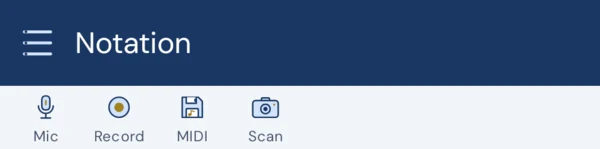
Yes — that is what the notation screen is for. Press Record, play, and the notes you played are transcribed onto a staff as you go. It takes microphone or MIDI input, and there is a quantize control for tidying the rhythm afterwards, because nobody plays perfectly on the grid.
The result is an ordinary score in your library: you can grade yourself against it, export it, or keep editing it by hand.
Also asked as: transcribe my playing · record to sheet music · notate what I play · audio to notation · write it down for me · improvisation to score
Can I enter notes by hand instead of playing them?
Yes. The notation screen has a row of tools for it: note values including dotted ones, rests, ties and slurs, chords, octave shifts up and down, left- and right-hand assignment, repeat starts and ends, bar splits and a snap-to-bar. Undo is there throughout.
It is a notation editor rather than a full engraving program — it is built to get a piece in so you can practise it, not to typeset an edition.
Also asked as: notation editor · write music · compose · type in notes · score editor · input notes manually
What happens to the time when I delete a note?
The app asks, because there is no answer that is right every time. You can insert a rest and keep everything where it is, close the gap and move the later notes up, or let the note before or the note after absorb the freed time.
Being asked once per deletion is mildly annoying and much better than discovering later that half your bars have quietly changed length.
Also asked as: delete a note · remove a note · gap in the bar · wrong note · bar length changed · undo a note
Can I write on a score the way I would on paper?
Yes, and it goes further than pencil. You can add fingerings, dynamics, hairpins, articulations, highlights and free text, change a note's pitch or written value, add clef changes mid-piece, add ties and slurs, and add repeats and jumps.
Annotations are stored beside the score rather than written into the imported file, so the original stays as it arrived and your markings travel with it in a library backup.
Also asked as: mark up the score · write on the music · pencil marks · fingerings · highlight a passage · add a note to myself · edit the score
Can I change the key signature or the clef?
Both. The key signature can be changed for the piece, and a clef change can be added at any bar and beat, with the line it sits on and an octave shift if you need one — a treble clef sounding an octave lower, for instance, as tenor parts are written.
This edits how the piece is written, not what the app expects to hear: it still grades you against the pitches on the page.
Also asked as: key signature · clef change · transposing clef · octave clef · wrong clef · bass to treble
Can I add or fix repeats and jumps?
Yes — repeat starts and ends, and the jump structures a score needs when the printed edition has them and the imported file does not. It matters more here than in a program that only draws music, because the score follower actually takes the repeats: if the file is missing one, the app will expect you to carry straight on where you know you go back.
Also asked as: repeat signs · da capo · dal segno · coda · first and second time · volta · it doesn't repeat
Does it handle lyrics and multiple verses?
It shows lyrics under the vocal line and lets you choose which verse is displayed when a song has several, so you are not reading four lines of text under every note. There is a matching choice of which voice the lyrics belong to.
Also asked as: words · singing · verse 2 · text under the notes · song lyrics · solfège
Can it show guitar tablature?
A tab staff can be turned on from the control rail for pieces where it makes sense, and scanned pages that contain tablature are recognised as containing it. Guitar also gets a strumming strip, so a part written as chords can be practised as strumming rather than as individual notes.
There are two guitar input modes: full polyphonic guitar, which follows chords and strums, and a solo mode for single-note lead lines.
Also asked as: tab · tablature · frets · guitar · chords · strumming · ukulele
How does the strumming strip work?
It gives a chord part a rhythm to be played against. You set a strumming pattern over a range of bars, and the app follows your strumming rather than trying to match every note of the chord separately — which is what makes a strummed accompaniment gradeable at all.
The app also tells you which it is doing: following your strumming, or following the written notes.
Also asked as: strum pattern · rhythm guitar · chord rhythm · up and down strokes · accompaniment pattern
Why does one bar have a different number of beats?
Because something in the file or an edit left it that way, and the app is showing you rather than hiding it. Bars that do not match the piece's meter are listed as adjusted bars, and tapping one puts it back into the piece's time signature.
Pickup bars are a legitimate case of this and are treated as such — the list is for the ones that are not.
Also asked as: wrong time signature · bar too long · bar too short · incomplete measure · pickup bar · anacrusis
Can I open or save MIDI files?
The notation screen loads a MIDI file and saves what you have as one, alongside MusicXML and PDF export. MIDI is the right choice when you want the notes to move to another program; MusicXML is the better one when you want the notation to survive the trip.
Also asked as: MIDI import · save as MIDI · .mid file · export to DAW · move to another program
How does scanning a printed page work?
You photograph the page or import a photo or PDF, and it is sent to the Scoreflection server, where an AI model reads it into notation. The app asks before sending, and says plainly what the answer is: a machine transcription that will contain mistakes, marked as one, which you should check against the original before you play from it.
If a page holds more than one piece you are asked which to transcribe, since the reader takes one at a time. This is the one part of the app that uses the network, and it is the only thing that leaves your device.
Also asked as: photo of sheet music · OCR · OMR · scan sheet music · camera · PDF to notes · digitise printed music
How does it handle continued pedalling?
When a score writes Ped. once and then leaves it to the word simile, the app works out how far that continues and asks what you meant: end it at a bar you name, let it end automatically, or retake the pedal every bar, every half bar, every beat, or exactly as printed.
This exists because an unresolved simile is the difference between playing the passage as written and playing it in a wash. Expressive playback holds the pedal wherever the score says to.
Also asked as: pedal · Ped. · simile · sustain · damper · una corda · pedalling
Can I work with chords rather than individual notes?
Where a score is chordal, yes. There is a picker for choosing a single note out of a chord when you need to edit just one of them, and guitar and ukulele have polyphonic input that follows chords and strums rather than expecting one note at a time.
That distinction matters for grading: a chord-capable instrument is followed as chords, and a single-note one is not, which is why the app offers to switch you if you start playing chords with a violin selected.
Also asked as: chords · chord symbols · lead sheet · accompaniment · strumming · polyphonic · ukulele · guitar chords
What is the difference between annotating a score and editing it?
Where you are. The notation screen is an editor: you record or type notes and the file is the thing you are building. Annotation happens on a score you have opened to play, and it is kept beside that score rather than written into it — so the imported file stays exactly as it arrived, and your markings travel with it in a library backup.
The overlap is deliberate. Annotation can add and delete notes as well as fingerings and dynamics, so a wrong note in an imported file can be fixed where you found it, without opening an editor and without touching the original.
Also asked as: annotate vs edit · does it change my file · original file · non-destructive · markup · will it overwrite
How do I insert a note?
Choose Add note, then tap the position you want it at — the dialog names where you landed, as the measure, the staff and the beat, so you can see you have hit the right place before committing to anything.
The pitch is typed rather than dragged: C4, F#5 or Bb3, or a MIDI number if that is how you think. Then a duration, a dotted switch, and whether it is a rest, a grace note or a slashed acciaccatura. You also say which voice it belongs to — an existing one or a new one.
Also asked as: add a note · insert · put a note in · missing note · write a note · enter notes · wrong note in the file
When I insert a note, what does "How should it fit?" mean?
A bar is already full, so adding a note has to take its time from somewhere and the app makes you say where. Add as chord stacks it on the note already there and costs no time at all. Shorten next and Shorten previous take the time out of the neighbour on that side. Fill new voice with rests puts it in a voice of its own and pads the rest of the bar, which is what you want when the note is a second line rather than a change to the first.
A grace note is the exception and says so: it hangs off the next note, and the rhythm around it is unchanged.
Also asked as: bar is full · too many beats · doesn't fit · chord · shorten · new voice · overflow
How do I delete a note, and can I get it back?
Delete this note, on the note itself. Because the freed time has to go somewhere, you choose what happens to it: insert a rest and keep everything in place, close the gap and move the later notes up, or let the previous or the next note absorb it by growing into the space.
It is reversible. A deleted note offers Restore this note, so a deletion you regret is one tap away rather than a reason to re-import the file.
Also asked as: remove a note · undo delete · restore · wrong note · get it back · rest instead · close the gap
How do I change a note's pitch or length?
Both are on the note. The pitch is typed the same way as when inserting — MIDI, or C#4, Bb4, and Cn4 for a natural — and the written value is picked from the note durations, so a quaver that should have been a crotchet is a two-tap fix.
The same panel carries the note's own tempo in BPM, which is how you mark a single point where the music should move differently rather than re-marking the whole piece.
Also asked as: wrong pitch · change duration · note value · make it longer · edit a note · transpose one note · flat to sharp
Can I force an accidental to show, or hide one?
Each note has an accidental display setting with two positions. On AUTO it follows the conventions — the key signature carries what it carries, and a tie across a barline does not repeat its accidental. On FORCE the accidental is printed whatever the rules say.
FORCE is what you want for a courtesy accidental in a passage that keeps catching you out, and it is per note, so one reminder does not litter the rest of the page.
Also asked as: courtesy accidental · cautionary · show the sharp · hide the natural · reminder accidental · force
How do I add a tie or a slur?
Choose Add tie / slur, tap the note it starts on, then tap the note it ends on. The app asks which of the two you meant, since a tie and a slur are drawn alike and mean different things — a tie joins the same pitch into one longer note, a slur groups different pitches into one phrase.
An existing one is removed from either of its ends, and it names the note it runs to so you can tell which of several you are about to take out.
Also asked as: tie · slur · phrase mark · legato · join notes · curved line · bind two notes
How do I add a second voice to a staff?
When you insert a note you choose its voice, and New voice is one of the options; the fitting choice Fill new voice with rests then pads the rest of the bar so the new line is rhythmically complete rather than a note floating in an empty bar.
It is worth doing rather than stacking everything into one voice, because voices are what the rest of the app works in: each one gets its own row in the Voices & Sounds list, so it can be given its own instrument, hidden, coloured or silenced independently.
Also asked as: second voice · two parts on one staff · polyphony · inner voice · counterpoint · split the staff
How do I write first and second time endings?
A volta is set on the repeat it belongs to: you give the endings it covers, as numbers — 1,2 for a bracket that serves both passes — and how many bars it spans, and the app confirms which measures that works out to before you apply it.
This matters more here than in a program that only draws music. The score follower actually takes the repeats and the endings, so a volta that is missing or wrong is not a cosmetic problem: the app will expect you somewhere you are not.
Also asked as: first time ending · second time ending · volta · 1st and 2nd · repeat brackets · prima volta
How do I set a repeat, a jump or a repeat count?
Repeat barlines are added at the bar they belong to, with a repeat count when a section should be played more than twice, and the jump directions — the segno and coda family — are set the same way. Any of them can be removed again.
Between them they are how you make an imported file agree with the printed edition it came from, which is worth the few minutes: everything downstream, playback and listening alike, follows the structure the file describes rather than the one on the paper.
Also asked as: repeat sign · da capo · dal segno · coda · segno · play twice · repeat count · jump
A bar has too many beats in it. How do I fix it?
Three tools, depending on what went wrong. Snap this bar back to the piece's meter takes a bar that has drifted and puts it back into the time signature. Moving notes to the previous or the next bar shifts the barline through the music, and you choose whether that moves only what you selected or the selection and everything after it — the second is the one you want when a whole passage is a beat out.
The rest is spacing rather than rhythm: an even-out control distributes the notes in a bar, for when a recording left them bunched.
Also asked as: wrong bar length · too many beats · barline in the wrong place · shift notes · ripple · snap to meter · off by one beat
My recording came out with impossible rhythms. Can it be tidied?
That is what quantize is for: it rounds what you played to the note values you meant, so a phrase that transcribed as a thicket of tied thirty-seconds becomes the quavers it was. There is an automatic setting for the written value, and you can override it where the automatic answer is wrong.
It is a judgement call rather than a repair, which is why it is a control and not something applied silently on the way in — some music really is played that far off the grid, and rounding it would be a lie about the performance.
Also asked as: quantise · tidy the rhythm · messy transcription · snap to grid · rounding · weird note values
How do I set the title, key and time signature of something I wrote?
Score setup holds them together: title, an optional author, the key signature, the time signature, whether the piece starts with a pickup bar, and the tempo. It is worth filling in before you get far, because the key and the time signature are what everything after them is written against.
There is also a pair of controls for doubling or halving the notated tempo. Doubling writes the same music in twice the bars at double the note values, and halving does the reverse — the piece sounds identical, and it is the fix for a transcription that came out in the wrong note values throughout.
Also asked as: title · composer · key signature · time signature · pickup · anacrusis · half time · double time · note values are wrong
How do I add or adjust a rest?
A rest is inserted the same way as a note, with the rest switch on, so it takes the same fitting choices and lands in the same voice you pick. Where a rest already exists it can be cropped from either end or laid in parallel with what is already there, which is how you make room in one voice without disturbing the other.
Deleting a note and choosing to insert a rest gets you to the same place from the other direction.
Also asked as: rest · silence · pause · empty beat · add a rest · shorten a rest
Can I put fingerings, dynamics and my own notes on the page?
Yes, all on the note itself: a fingering, a dynamic, a hairpin, an articulation, an ornament, a highlight, and free text of your own for the things no symbol covers. Fingerings can also be cleared in bulk when a set has stopped suiting you.
Each of these is set, kept or removed rather than only toggled on, so an annotation can be taken back off a note without taking off everything else you put there.
Also asked as: fingering · dynamics · hairpin · crescendo · articulation · write a note to myself · highlight a note · pencil
Can I annotate a whole bar, or move an annotation I put in the wrong place?
Both. A measure has its own annotation panel, reached by naming the bar number, which is quicker than hunting for it on the page when the piece runs to a hundred bars.
Anything attached to a bar can also be moved: give it a new start measure and apply, and it relocates rather than having to be deleted and made again somewhere else.
Also asked as: annotate a bar · measure annotation · move an annotation · wrong bar · relocate · bar number
Can I redo a transcription without recording again?
Yes — re-transcribe runs the recording through again, which is worth doing after you have changed the settings the transcription depends on. It saves playing the passage a second time to find out whether a different setting reads it better.
A recording keeps its notes even when the audio alongside it could not be saved, so what you played is not lost to a storage problem.
Also asked as: transcribe again · redo · re-run · recognition was wrong · try again · reprocess
Library, export and sharing
How do I keep the library tidy?
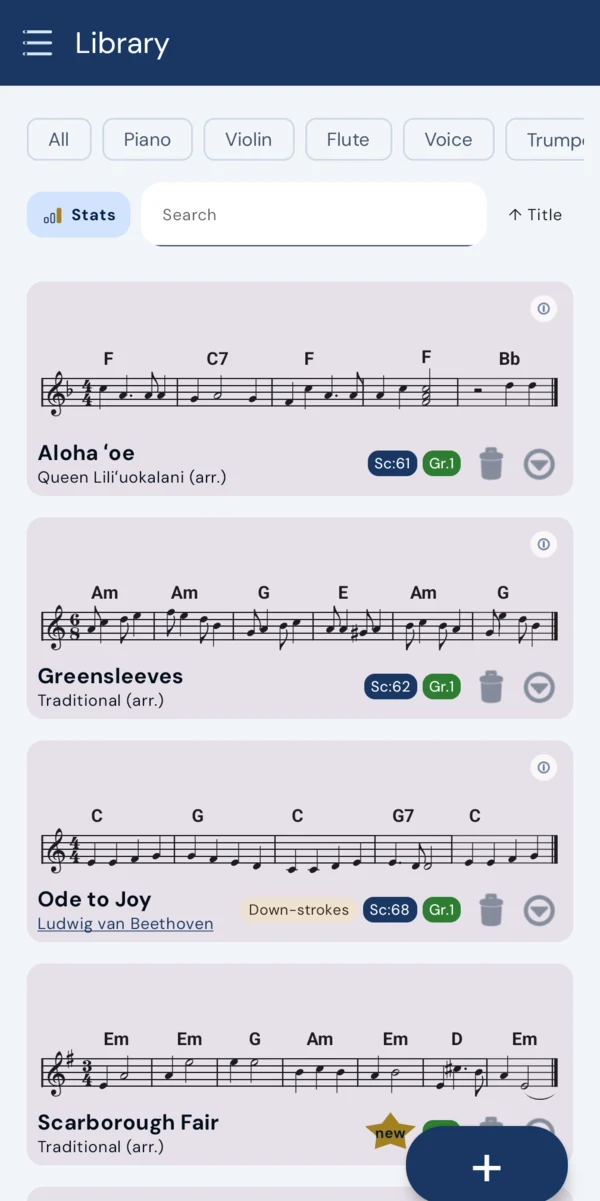
Scores can be renamed and moved into folders, and you can select several at once to move them together. There is a search box, and filters for format and for instrument, so a library that has grown past the point of scrolling is still navigable.
The instrument filter is more useful than it sounds: it knows which pieces fit the instrument you play as written, and which would need transposing.
Also asked as: folders · organise · rename a score · sort · search my scores · too many files · find a piece
How do I back up everything, or move to a new phone?
Export your library. It bundles every imported score together with its annotations into a single .zip you can keep as a backup or carry to another device, and the matching import restores it.
Importing skips any file whose name already exists rather than overwriting it, so restoring onto a phone that already has scores will not quietly replace them — delete the existing entry first if you actually want it replaced.
Also asked as: backup · new phone · transfer · move my scores · restore · zip · change device · keep my annotations
How do I get a score out of the app?
Export it as MusicXML, as PDF, or as MIDI. MusicXML is the one to use when the score is going into another notation program and you want the notation to arrive intact; PDF is for printing or sending to someone to read; MIDI is for when only the notes matter.
Exported files land in the app's own Documents folder, where the phone's Files app can reach them.
Also asked as: export · save as PDF · print · send to someone · MusicXML out · get my file · share a score
Can I split a score into separate parts?
Yes — a score with several parts can be split so each becomes a piece of its own, which is what you want when you have imported a full ensemble score but only play one line of it. A LilyPond import that contains several parts asks up front whether you want one combined score, one file per instrument, or one file per movement.
Splitting is not available on iOS yet.
Also asked as: separate parts · extract a part · one instrument only · orchestral score · my part only · split
Can I send a score to my phone from a computer?
Yes. A score you open in Scoreflection in a browser can be sent to your signed-in account, and the phone collects it the next time you open the app — or immediately, if you tell it to check now in settings.
It is the practical answer to finding something on a computer when the instrument and the phone are in another room.
Also asked as: from my computer · send to phone · browser to app · sync · get it onto my phone · desktop
What is the community library?
A shared collection you can download scores from and contribute your own to. Donating a score needs its composer to be known, since that is what decides whether it can be shared at all — a machine transcription of a page whose composer the app cannot identify stays in your own library.
It is one of the few parts of the app that needs an account and a connection.
Also asked as: shared scores · public domain · download scores · free sheet music · upload a score · contribute
What is the community forum, and why does it ask my age?
It is a forum for people using the app, and it is for members sixteen and over, so the app asks how old you are before opening it. Everything else in Scoreflection works either way — the library, practice, the games and the tuner are unaffected.
It asks for a real first and last name, kept private and never shown, so that there is someone behind every post, and separately for the forum name everyone actually sees, which can be anything you like.
Also asked as: forum · age limit · 16 · why do you want my name · community · social · under 16
Where do my recordings go?
Into My recordings, which you reach from the control rail. Recording captures what you played while the listener was running, so you have to be listening before you can record — and each take can be renamed or deleted afterwards.
A take stores the notes, and the audio too where the device allows it; if the audio file cannot be opened, the notes are still kept rather than the whole take being lost.
Also asked as: record myself · my takes · playback my performance · listen back · audio recording · delete a recording
Can I print a score on paper?
Yes, through PDF export, which opens a print preview first: you page through it, and you set the staff size and the page margin before saving, so the printed copy is laid out for paper rather than being a screenshot of a phone.
Anything you have annotated prints with it, which is the point of printing from here rather than from the original file.
Also asked as: print · on paper · PDF · print out · hard copy · music stand · page margin
Privacy and offline
Does anything I play get uploaded?
No. Transcription and grading both run on the device, and the audio never leaves it. Scoreflection works with the network switched off.
What is the server for, then?
For the things that genuinely need one: the community forum, the shared score library, and scanning a photographed page. It is never involved in listening to you play.
What data do you collect?
Diagnostics are opt-in, bucket by bucket, so you choose what to share rather than switching one blanket setting. There are no free-text events, uploads happen on Wi-Fi only, and you can export or erase everything we hold whenever you like.
The privacy policy spells out each bucket in full.
Do you track me?
Not in the way that word usually means. As things stand today, Scoreflection has:
- no advertising network, and no adverts of any kind;
- no third-party analytics service, so nothing about you is sent to anybody else;
- no profile of you, and no automated decision that has any legal effect on you.
What we do have is a counter. When a page is opened or a button is pressed, a number goes up for that page, that button, that day and that language. It carries no identifier, no IP address and no clock time, so there is no row in it that is about you rather than about a page — which is why it does not ask your permission, and why there would be nothing of yours to give back if you asked for it.
We also sometimes show two versions of a page to find out which one explains things better. Remembering which one you saw does put something on your device, so that one we ask about, and the banner is the asking. Say no and nothing is stored and nothing about the site changes; say yes and Privacy choices at the foot of any page takes it back again. The privacy policy was updated to say all of this before any of it started, which is what this answer used to promise would happen.
Can I use Scoreflection completely offline?
Yes. Opening a score, playing along, being graded and reading the marked-up page all run on the device with the network switched off. Only the community forum, the shared score library and scanning a photographed page need a connection.
Plans and billing
What does Scoreflection cost?
Reading is free forever: the score library, playback, the metronome, the tuner and the two games that only ask you to listen — Interval Trainer and Rhythm Echo — cost nothing. Practice is €8 a month and adds everything that listens back: graded play-along with note-by-note verdicts, tempo and dynamics coaching, the notation editor, practice plans, your session history, and the games that judge what you play.
What stays free forever?
The score library, importing MusicXML, MXL, MNX and LilyPond files, playback, the metronome, the soundfont, the tuner, and the two games that need no microphone — Interval Trainer and Rhythm Echo. What a subscription pays for is the listening engine, so everything that needs it sits with a plan: the graded play-along, the notation editor, which records and transcribes what you play, and the three games that judge your playing — Flash Notes, Chord Builder and Hill Climb.
Settings, devices and account
Can I change the app's language?
The app follows your device language by default, and you can override it in settings — the website and the app both come in English and German. Changing it restarts the screen you are on so the new language takes effect.
Also asked as: language · English · German · Deutsch · change language · localisation
Is there a dark mode?
Yes, and three ways to get it: follow the phone's own setting, or force light or dark regardless of what the phone is doing. Reading music on a lit stage and reading it at a kitchen table are different problems, so the override is there for when the phone's answer is wrong for the room.
Also asked as: dark mode · light mode · night mode · theme · colours · too bright
Is a tablet better than a phone for this?
A bigger screen fits more bars per line at a readable size and makes the half-staff scroll style usable, since that one needs room for two lines at once. A phone works — the app is built around it — but if you have a tablet on the music stand already, it is the better place for a score.
The layout re-wraps to whatever width it is given rather than assuming a size, so neither is a compromise version of the other.
Also asked as: tablet · iPad · big screen · phone or tablet · screen size · music stand
How does a MIDI instrument connect?
Over USB. Plug a digital piano or controller into the phone and the app can take its input instead of the microphone, which removes the room from the equation entirely — no background noise, no placement, and no doubt about what you played.
Where the listener starts automatically, it will use a connected USB MIDI instrument in preference to the microphone.
Also asked as: USB MIDI · digital piano · keyboard · controller · cable · connect keyboard · no microphone
Will the screen turn off while I am playing?
Not while the app is listening or playing — it holds the screen awake for as long as a session is running, which is the whole time you would be looking at it. It lets go again afterwards rather than keeping the screen on all day.
Also asked as: screen timeout · stays awake · goes dark · sleep · keep screen on · display turns off
Does everything work the same on iOS?
Not yet. Importing scores, importing compressed archives — .zip and .mxl — and splitting a score into parts are Android-only for now; on iOS, pick the MusicXML or MNX file directly rather than an archive.
The parts that matter most — reading, playback, listening and grading — work the same on both.
Also asked as: iPhone · iOS · Apple · differences · not available · Android only
What is taking up all the space?
Usually soundfonts. The bundled one is around 45 MB and the full FluidR3 download is about 144 MB, which is larger than everything else the app keeps put together. Settings has a storage section that breaks it down, soundfonts listed separately, so you can see what you are actually paying for in space.
Also asked as: storage · disk space · app size · too big · free up space · why is it so large
Which parts actually need an account?
The community forum, the shared score library, and sending a score from a browser to your phone — all three are things that involve other people or another device, which is why they need a server to have heard of you.
The features that listen need one too. Graded play-along, coaching, the notation editor and annotations, practice plans, session history and the three games that judge what you play are the Practice plan, and the subscription is tied to your account. Once you are signed in, they still run on the phone and work offline.
Everything on the free plan works signed out and offline: opening and importing scores, playback with the metronome, the tuner, and the two games that don't listen — interval training and rhythm echo.
Also asked as: sign in · account required · login · offline · without an account · do I have to register
Is there a tuner?
Yes, in the main menu, and it costs nothing. It listens, names the note it hears and tells you how many hertz you are above or below it, and it holds a set of tunings including custom ones you define yourself for an instrument that is not tuned in the usual way.
Like everything else that listens, it needs microphone permission, and nothing it hears is recorded or uploaded.
Also asked as: tuner · tune my instrument · in tune · pitch · Hz · alternate tuning · drop D · chromatic tuner
Can I use a different instrument for one piece?
Yes. There is an input instrument in settings that says what you normally play, and it can be overridden for a single piece from the menu inside that piece. The choice picks the pitch-detection engine — polyphonic for piano and guitar, single-note for voice and wind — and applies the transposition an instrument like a B flat clarinet needs.
Setting a score's transposing instrument can set your live input instrument at the same time, so the two do not drift apart.
Also asked as: change instrument · input instrument · I play two instruments · per piece · switch instrument · override
How do I cancel a subscription?
Through the store you bought it from, the same way as any other app subscription, and there is a page on this site that walks through it: see cancelling your contract.
Cancelling stops the next payment and leaves the plan running until the period you have already paid for ends. Your scores, annotations and statistics are not touched by it — they live on the device.
Also asked as: cancel · unsubscribe · stop paying · end subscription · refund · billing · how do I quit
What happens to my scores if I stop paying?
They stay. Your library, your annotations, your recordings and your practice history are on the device and are not held hostage by a plan — you keep reading, playing back, importing, exporting and using the metronome and the tuner exactly as before.
What stops is the listening engine and the features built on it. Nothing is deleted, and starting a plan again picks up where you left off.
Also asked as: subscription ended · stop paying · lose my scores · downgrade · what do I keep · free again · locked out
How do I delete my account?
From Account in the app, or from the deletion page on this site. We email you a link, and the account is only erased when you open it — the link expires after an hour. Any subscription is cancelled first, so you are not billed again. It cannot be undone.
Three things outlive the account and none of them names you afterwards: scores you donated stay in the shared library, moderation reports you filed stay with the report, and the security log keeps that an account existed with your address removed. Practice statistics and contributed audio were never linked to your account in the first place, and are erased separately under Data Sharing.
Also asked as: delete account · close my account · remove my data · GDPR · erase · right to be forgotten · unregister
Can I set this up for my child?
Yes. The age question has a one-tap answer for it — mark it as a child's account and there is nothing else to fill in. The only thing that changes is the community forum, which is for members sixteen and over; the library, practice, the games and the tuner all work exactly the same.
A date of birth is optional. Give it and the account keeps up with birthdays on its own; leave it out and an age is enough.
Also asked as: child · kids · my son · my daughter · age · parental · under 16 · family · for a student
Troubleshooting
The app does not seem to hear me at all. What should I check?
Check that the app is allowed to use the microphone, since a denied permission looks exactly like silence, and check that nothing else on the phone has taken the microphone — a call or a recording app will hold it. After that it is usually placement: put the phone where it can hear the instrument rather than behind the music stand, and play a few notes to confirm the input is moving.
It keeps losing my place in the score. What can I do?
The follower needs to hear you clearly to stay with you, so the usual cause is the input rather than the piece: a phone too far away, a noisy room, or an instrument much quieter than the background. Moving the phone closer is the first thing to try, and connecting a MIDI instrument removes the problem entirely where that is an option.
My practice room is noisy. Does that matter?
Some background noise is expected and the model was built for real rooms rather than studios, but a fridge, a fan or a conversation nearby will cost you accuracy on the quietest notes. Getting the phone closer to the instrument helps more than anything else, because it improves what the model hears rather than asking it to guess. On a digital piano, connecting over MIDI sidesteps the room completely.
It says I played the right note in the wrong octave. Why?
Octave errors are the characteristic mistake of pitch detection, because a note and the note an octave above it share most of their overtones. The app knows this and recognises octave slips for what they are rather than calling them wrong notes, but a thin or distant signal makes them more likely.
On a wind instrument the cause is often real rather than technical — an overblown note, or a thumb that is not quite pinched. The instrument guide will tell you which of the two it heard.
Also asked as: octave · an octave too high · an octave too low · overblowing · wrong octave · harmonics
It offered to change my instrument when I started playing. Why?
Because you played chords while a single-note instrument was selected. Violin, flute and voice are followed by a single-note pitch detector, and it cannot make sense of three notes at once, so the app offers to switch you to a chord-capable instrument — the one the score names, if it names one, and otherwise piano.
It only happens on microphone input, and only at the start of a piece.
Also asked as: wrong instrument · chords not detected · polyphonic · switch instrument · it asked to change · piano vs violin
Playback is running but I cannot hear anything.
Check the per-voice sounds first: a voice set to No Sound stays silent, and so does one whose volume slider has been left at the bottom, and both are easy to leave set from a previous session. If every voice is silent rather than one, the app will say when playback itself is unavailable, and that needs a restart.
Also asked as: no sound · silent · can't hear playback · muted · volume · nothing plays
It will not import my file. What now?
Check the format first: MusicXML, MXL, MNX and LilyPond are what it reads, and a PDF is not a score file — a PDF has to go through scanning instead. On iOS, compressed archives are not supported yet, so unpack the .mxl or .zip and pick the MusicXML or MNX file inside it.
If the file is one of the right formats and still will not open, it is worth sending to us — a file that a program wrote and this one cannot read is a bug here more often than a bad file.
Also asked as: import failed · won't open · unsupported format · PDF · mxl · zip · file error · corrupt
The camera will not open for scanning.
The permission was declined, and the app cannot re-ask for it itself. Grant camera access in the phone's settings under privacy, or sidestep it entirely by importing a photo or a PDF you already have — scanning does not care whether the image came from the camera or the gallery.
Also asked as: camera permission · can't take a photo · scan won't work · allow camera · blocked
It keeps warning me that I am playing too fast.
That warning fires when you play faster than the tempo you have set, and it is trying to tell you that the whole piece is unlikely to survive at that speed. If you meant it, carry on and it steps out of the way.
If you would rather not be interrupted, the warning can be reduced to a brief toast instead of a dialog, or switched off entirely — Adapt Speed will still rescale playback to what you are actually doing.
Also asked as: too fast warning · tempo dialog · stop warning me · annoying popup · BPM warning
What happens if the listening model fails to load?
Live input falls back to the classic pitch detector automatically rather than stopping. You lose some accuracy, particularly on piano where the trained model is doing the most work, but the session continues and you are not left with a score that will not listen.
Also asked as: model error · detector failed · experimental · fallback · less accurate · won't load
Some notes are marked pale rather than wrong. What does that mean?
Pale noteheads are notes you played too softly to count properly rather than notes you got wrong — the pitch was there but the sound was not. On a quiet instrument or a phone placed too far away this is the first thing to appear, and it is a signal about the input rather than about your playing.
Moving the phone closer usually clears a page of pale notes in one go.
Also asked as: pale notes · too soft · faded · grey noteheads · not loud enough · what do the colours mean
Still stuck?
If your question is not here, write to us — we answer them ourselves. Get in touch.